¶ Order submission
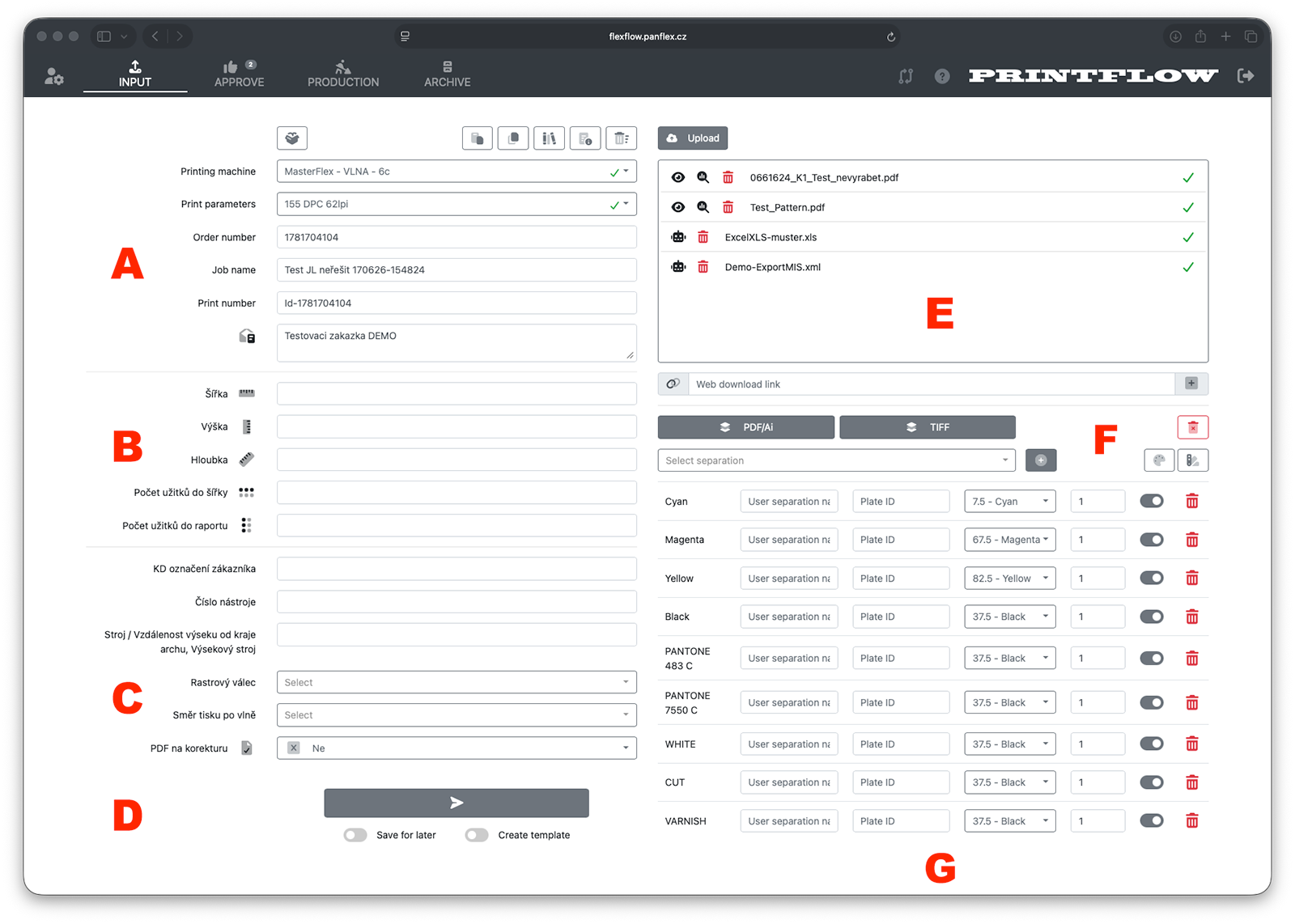
¶ Main parts of the form
¶ A - Mandatory data for order submission.
Basic, mandatory information for creating and ordering an order.
The printing press and press parameters characterize the technology and parameters of polymer production.
¶ B - Order parameters for production.
Production parameters relating to the specific order being submitted.
Technological parameters of the order.
The form fields depend on the specific press parameter.
¶ C - Additional order parameters.
Additional data for the submitted order.
Data for print tables, etc.
The form fields depend on the specific press parameter.
¶ D. - Sending and ordering the order.
Sending the data to the application server and ordering the order.
Sends the polymer production order.
Save for later saves the form in progress, including uploaded files, for later completion.
Create template saves the completed form as a template.
¶ E. - Uploading files.
List of all files that will be sent to Panflex when the order is submitted.
Upload Opens a dialog for selecting files from disk.
Files can also be dragged and dropped directly into the uploaded files display area.
displays graphic data (pdf, ai, tif) in the internal viewer PROOFSCOPE.
starts the data analysis.
removes the file from the list of files being uploaded.
fills in the form from an uploaded file (xls, xml, csv, json ...)
field for entering an external link to download data
adds another field for entering a link to an external data source
¶ F. - Setting the order's separations
Setting the required separations for polymer production.
PDF/Ai reads separations from the uploaded PDF
inserts a custom separation.
selects a PANTONE swatch book to insert a separation.
+ adds the selected separation to the production list.
clears the entire list of entered separations.
¶ G. - List of separations for production
List of all separations for which polymer production is requested.
Custom name custom name of the separation
Plate number custom polymer number
¶ Description of the form buttons
List of saved orders in progress.
Displays a list of previously saved orders in progress and loads the saved data and files.
Pastes form data from the application clipboard.
The data of the last ordered order is automatically copied to the clipboard.
Data can also be copied to the clipboard from the detail of an active or archived order using the button.
List of active orders.
Displays a list of active orders and inserts the data of the selected order into the form.
List of order templates.
Displays a list of saved templates and inserts the selected data into the form.
Info about the press parameters.
Displays the technological information belonging to the selected press parameter.
Reset the form
Completely clears the form, including uploaded files and configured separations.